
The WordPress SEO Plugin Built After 20 Years of Practice
200+
Websites Built
2020
Established In Cumbria
24/7
Customer Support

Built Because Nothing Else Did the Job Without Compromises
Every available WordPress SEO plugin required compromises. Yoast and Rank Math conflict when both are active — duplicate schema blocks, duplicate sitemaps, meta tag conflicts that actively harm your rankings. Neither handled every schema type we needed. Neither managed follow/no-follow correctly across all post types. Neither let you select exactly which image Google and social platforms use for each page.
After 20 years of SEO practice, we built our own. One plugin. No conflicts. No duplicates. No shortcode junk in your meta descriptions. Everything automated and updating as your site grows. We use it on every client site we manage for SEO across Cumbria and the North West — because it is simply the best tool for the job.
How the Technophobia SEO Tool Works
Six core features — all automated, all correct, all updating as your site changes. No manual maintenance required.
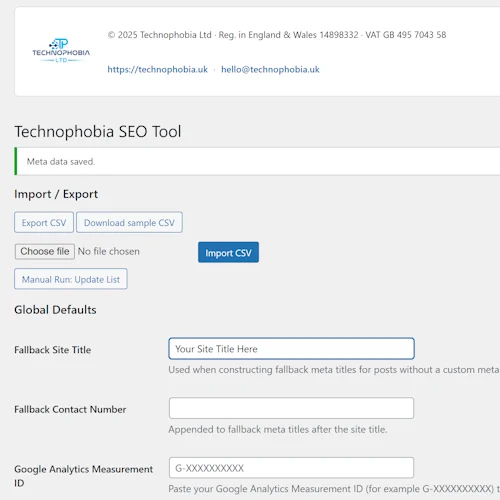
The Technophobia SEO Tool in Action

Meta Tag Configuration
Title tags and meta descriptions configured per page — keyword-researched, unique, never duplicated.

Schema Markup Output
Clean, correct structured data output — verified against Google's Rich Results Test on every deployment.

SEO Image and Social Meta
Choose your SEO image and preview exactly how your page appears when shared on social platforms.
Why It Outperforms Yoast, Rank Math, and Every Generic SEO Plugin
Generic SEO plugins are built for the average WordPress site. They make assumptions about your content structure, your business type, and how your schema should be configured. Those assumptions are frequently wrong — and incorrect schema actively harms your search performance more than no schema at all.
No conflicts — one plugin does everything. Yoast and Rank Math are designed to be the only SEO plugin on a site. Use both — which many sites do — and you get duplicate schema blocks, duplicate sitemaps, and meta tag conflicts that confuse Google. The Technophobia SEO Tool replaces both. One plugin, no conflicts, no duplicates, no overlap.
Correct schema for your business type. A LocalBusiness schema for a Cumbrian trades business requires completely different configuration than a Product schema for an ecommerce store. Generic plugins apply template configurations. Our plugin applies configurations specific to your site architecture and business type — because we configure it as part of every site build or SEO onboarding.
No shortcode junk in your meta descriptions. A common problem with Yoast specifically — shortcodes left in content appear raw in meta descriptions, producing results like "Get a quote [contact-form-7 id=123]" in Google search results. Our plugin separates SEO configuration from content completely. Meta descriptions are configured at the SEO level, never pulled raw from content.
Follow/no-follow management that actually works. Correct link attribution across all link types — internal links, external links, affiliate links, sponsored content — across all post types. The technical detail that most WordPress sites get wrong because generic SEO plugins do not handle it consistently across custom post types and page builders.
Schema Markup — Eight Types, All Automatic, All Correct
Schema markup is the structured data that tells Google precisely what your business is, where it is, what it does, and how your content is organised. Without it, Google infers this information from your page content — and it frequently infers incorrectly, costing you rankings and rich result opportunities.
LocalBusiness schema — your business name, address, phone number, opening hours, and business type. The technical foundation of strong local search performance and Map Pack visibility in Barrow, Kendal, Carlisle, and across Cumbria.
FAQPage schema — your questions and answers appearing directly in Google search results as expandable FAQ rich results. More space in search results, higher click-through rates for informational searches.
AggregateRating schema — the gold star ratings that appear in your search results. Businesses with visible star ratings consistently achieve higher click-through rates than those without.
Service schema — each service you offer described in structured data Google can parse, understand, and present correctly in search results and AI-generated responses.
All eight schema types are generated automatically, verified against Google's Rich Results Test on deployment, and updated as your site changes. No manual configuration per page. No risk of outdated or incorrect structured data. Correct and current — always.
Where the Technophobia SEO Tool Is Used
The SEO Tool underpins our SEO work across all client engagements. Read about the services it supports.
Read About Our Other Plugins
Technophobia SEO Tool — Frequently Asked Questions
The plugin is primarily deployed on sites we build and manage. If you want it on your existing WordPress site, contact us to discuss — we can install, configure, and manage it as part of an SEO retainer, or discuss standalone options.
Yes — completely. It handles everything Yoast and Rank Math handle, plus schema types and configurations neither manages correctly. We deactivate existing SEO plugins as part of installation to eliminate all conflicts.
LocalBusiness, Service, FAQPage, Product, AggregateRating, BreadcrumbList, WebPage, and Organisation — all generated correctly for each page type automatically, without manual configuration per page.
Yes — built specifically for WordPress and tested with Breakdance on every site we build. No conflicts, no duplicate output, correct schema on every Breakdance-built page.
Yes — actively maintained and updated as Google's structured data requirements change. Clients on SEO retainer receive updates automatically. Schema that passes Google's Rich Results Test today and continues to pass it as requirements evolve.
Want the Technophobia SEO Tool on Your Site?
Specialist
Contact Us
Monday, Tuesday, Thursday, Friday
9 am - 4 pm
out of hours 07470412889
Cookie preferences
Choose which cookies you are happy for us to use. You can change your mind at any time from the Cookie settings button.
About functional cookies
Needed for the website to work and to keep it secure, for example remembering your cookie choices, keeping a basket or booking together and protecting forms from spam. These are always on.
About preferences cookies
Remember choices you make, such as how a list is displayed, so the site works the way you prefer.
About statistics cookies (1 service)
Help us understand how visitors use the website so we can improve it.
About marketing cookies (1 service)
Used by third-party services such as maps, videos and social media, which may track you across other websites.